One task at a time.
Add a title, description and due date. Choose a color, track what is pending and mark tasks complete as you go.
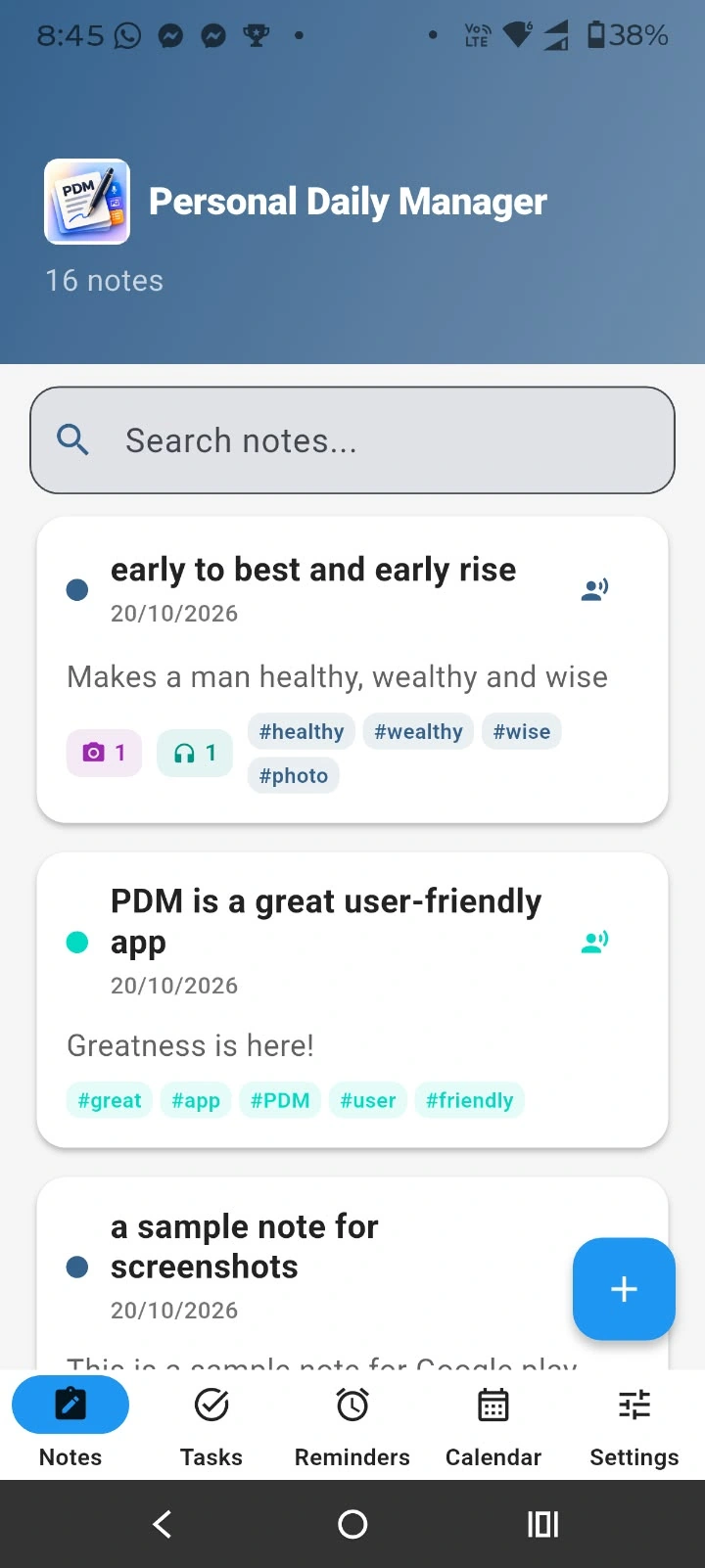
A private home for your notes, voice clips, tasks and reminders. Made for the little things that keep life moving.
Less scattered.
More together.
01 / CAPTURE WHAT MATTERS
So do your notes. Write a thought, save a voice clip or keep a photo with its text—all in one personal space.
Create, edit and organize text notes. Add photos and audio, choose a color and use hashtags to give your notes a little structure.
Record a voice note and keep it as an audio file or clip inside your note. Useful for a meeting recap, a lecture thought or an idea on the move.
Add a photo from your camera, gallery or files. On-device optical character recognition (OCR) extracts readable text from images into your note.
Choose a tab to explore the actual app screens.
02 / BRING THE AUDIO WITH YOU
Save the audio from a YouTube video, a video URL or a video already on your device. Keep the extracted file as a clip inside a note, ready to play back.
Pick a file, download from YouTube or import from a URL.
PDM extracts the sound and saves it as an audio file or clip.
Keep the clip alongside your note and listen again when you need it.
Online sources need an internet connection. Saved clips stay on your device.
03 / FROM A THOUGHT TO A PLAN
Give your plans a date, set a reminder and see how the month is taking shape.
Add a title, description and due date. Choose a color, track what is pending and mark tasks complete as you go.
Schedule reminders with notification alarms. Repeat them daily, weekly or monthly for the routines you want to keep.
Switch between week, two-week and month views. Date indicators help you spot tasks and reminders; select a date to see its items.
Take your calendar with youFor reliable reminder alarms, allow notifications and review your device's battery settings for PDM.
04 / PERSONAL MEANS PERSONAL
Your notes, photos, recordings, tasks and reminders live on your device. No account to create. No cloud storage to depend on.
Read the app privacy policyWrite notes, view saved content and manage local plans without a connection. Internet access is needed to fetch audio from online sources. Exporting and sharing are actions you choose.
05 / FEELS LIKE YOUR SPACE
Your language, your accent color and a comfortable view for day or night.
Choose light or dark mode, or let Auto follow your system. Pick an accent color to carry through PDM's Material 3 interface.
Switch accents to view the matching app screenshot.
Choose from the app's language options, with right-to-left layouts for supported languages. A familiar interface makes room for more people.
06 / ALWAYS YOURS
Keep control of your data, move your plans between apps and find recently deleted items.
Export notes, tasks and reminders as JSON. Share the exported file through the system share sheet, or import a JSON file back into PDM when needed.
Export calendar events as an .ics file for Apple Calendar, Google Calendar or Microsoft Calendar. Import .ics events into PDM as tasks and reminders.
File-based transfer, under your control.The recycle bin keeps recently deleted items within reach. Use the app's undo and recovery options, then clean up expired items when you are ready.
Clean Expired Items permanently removes items older than 90 days from the bin.
Local storage puts you in charge. Keep exported copies somewhere safe—PDM does not automatically back up to a cloud account.
A FEW GOOD QUESTIONS
The practical details, without the small print.
PDM is available on Google Play for Android. The iOS version is coming soon.
Your locally saved notes, photos, audio clips, tasks, reminders and calendar can be used offline. Image OCR runs on-device. Downloading audio from YouTube or another online URL requires internet access.
PDM saves recordings and extracted audio as audio files or clips; it does not transcribe speech. OCR extracts text from images, and text-to-speech reads written notes aloud.
Use Pick from Files for a video stored on your device, Download from YouTube for a video link, or Import from URL for an online source. PDM extracts the audio and saves it in a note. Availability can depend on the source.
No. PDM stores app data locally and does not require an account or cloud sync. You choose when to export or share a file.
Yes. Set a date and time, then choose a daily, weekly or monthly recurrence. Allow device notifications and review battery optimization settings if reminders are delayed.
Export and import notes, tasks and reminders using JSON. Use .ics files for calendar events compatible with Apple, Google and Microsoft calendar apps. These are manual file transfers, rather than cloud synchronization.
PDM is made by PSEI Australia (Wisam Pty Ltd). Explore PSEI Australia or read the app privacy policy.
Available for Android · iOS coming soon
Make room for your ideas, plans and everyday moments. PDM is available on Google Play. iOS version coming soon.